Going High Tech with HVACR Tools
Today’s easy-to-learn smart tools can tackle a variety of tasks

VERSATILITY: The Fieldpiece Job Link system combines wireless measurement probes with the Job Link app to measure various HVACR system characteristics and document measurements and tasks performed.
Whether technicians need to balance a forced-air system, diagnose a compressor fault, or safely evacuate refrigerant, there’s a smart tool for the task.
Today’s smart tools have adopted technical features common in everyday products — from cars and doorbells to phones — including wireless connectivity, battery power , and mobile app integration. The companies developing and making these tools tout them as intuitive and easy to learn.
The ACHR NEWS reached out to several specialty manufacturers about their HVACR smart products and how technicians can learn to use them properly. Here’s what they told us:
CPS Products’ EasyHood
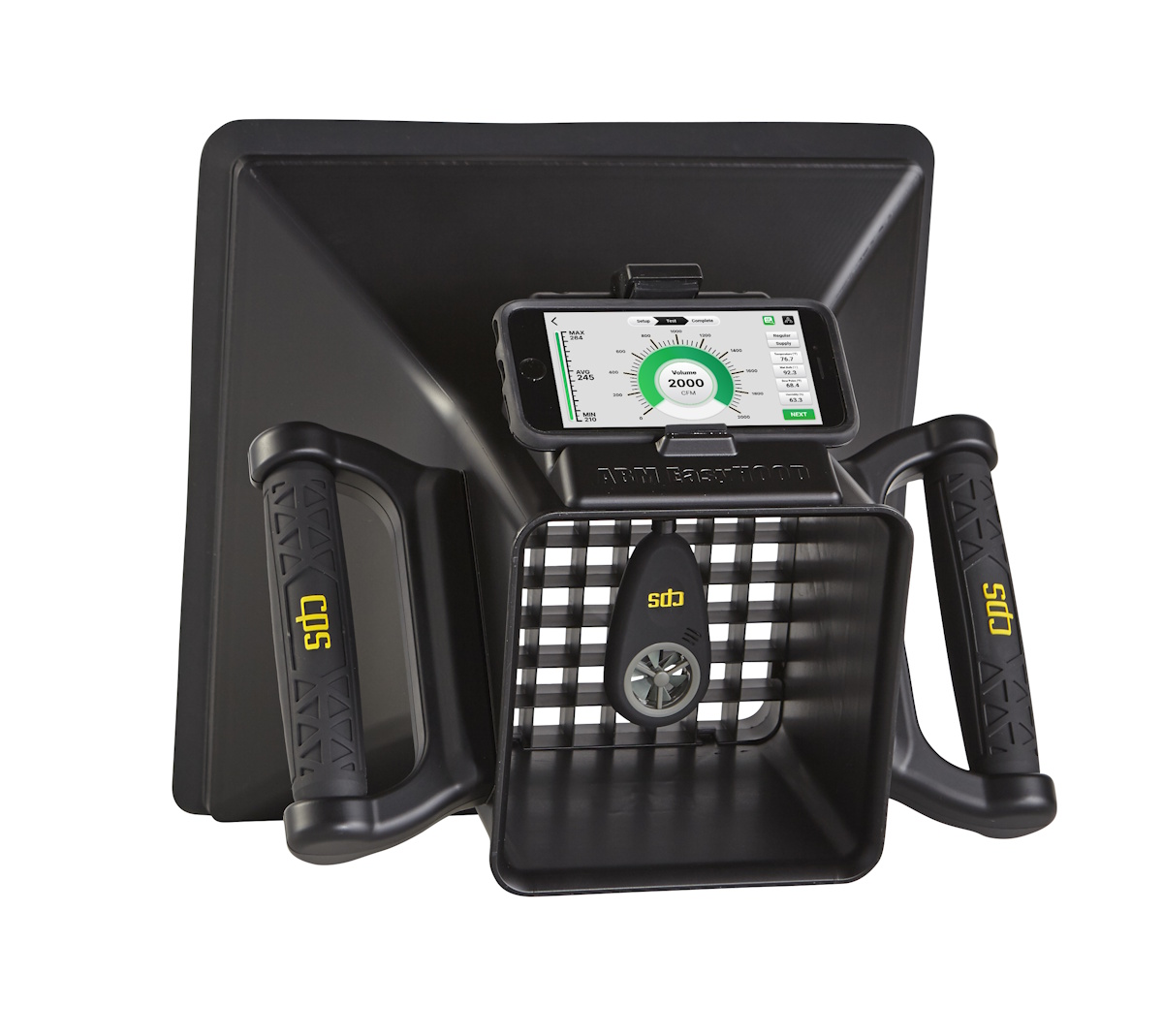
ON BALANCE: The ABM-HOOD-200 EasyHood from CPS Products makes measuring airflow from different duct registers easier when a technician sets out to balance a forced-air system. (Courtesy of CPS Products Inc.)
The ABM-HOOD-200 EasyHood, an air-balancing hood from CPS Products Inc., is designed to simplify the task of air-balancing a forced-air HVAC system.
“Balancing airflow in a home is crucial for ensuring consistent temperatures in every room, maximizing HVAC energy efficiency, and improving indoor air quality,” said Steve Downie, senior product manager for HVACR at CPS Products. “This helps prevent stuffy rooms and also reduces dust accumulation.”
The EasyHood measures air flow volume, temperature, wet bulb temperature, dewpoint, and relative humidity. It can be integrated with the CPS Link Pro and measureQuick apps in order to measure and track airflow and create reports that help technicians diagnose and solve air-balancing issues, Downie said
“The underlying technology is a game-changer,” he said. When the flexible EasyHood is placed over a register, the app performs the calculations, eliminating the need to calculate cfm based on air velocity and the dimensions of every register. “All you have to do is position the hood over the air duct register, take the reading, and move on,” Downie said.
Looking for quick answers on air conditioning, heating and refrigeration topics? Try Ask ACHR NEWS, our new smart AI search tool. Ask ACHR NEWS
The EasyHood is best suited for residential systems, Downie said, and enables techs to adjust systems so conditioned air reaches each room equally — eliminating hot and cold spots, reducing equipment strain, and boosting efficiency.
Learning the EasyHood is simple, Downie said; instructions and tips are included in the operator’s manual and within the Link Pro app.
Fieldpiece Job Link System
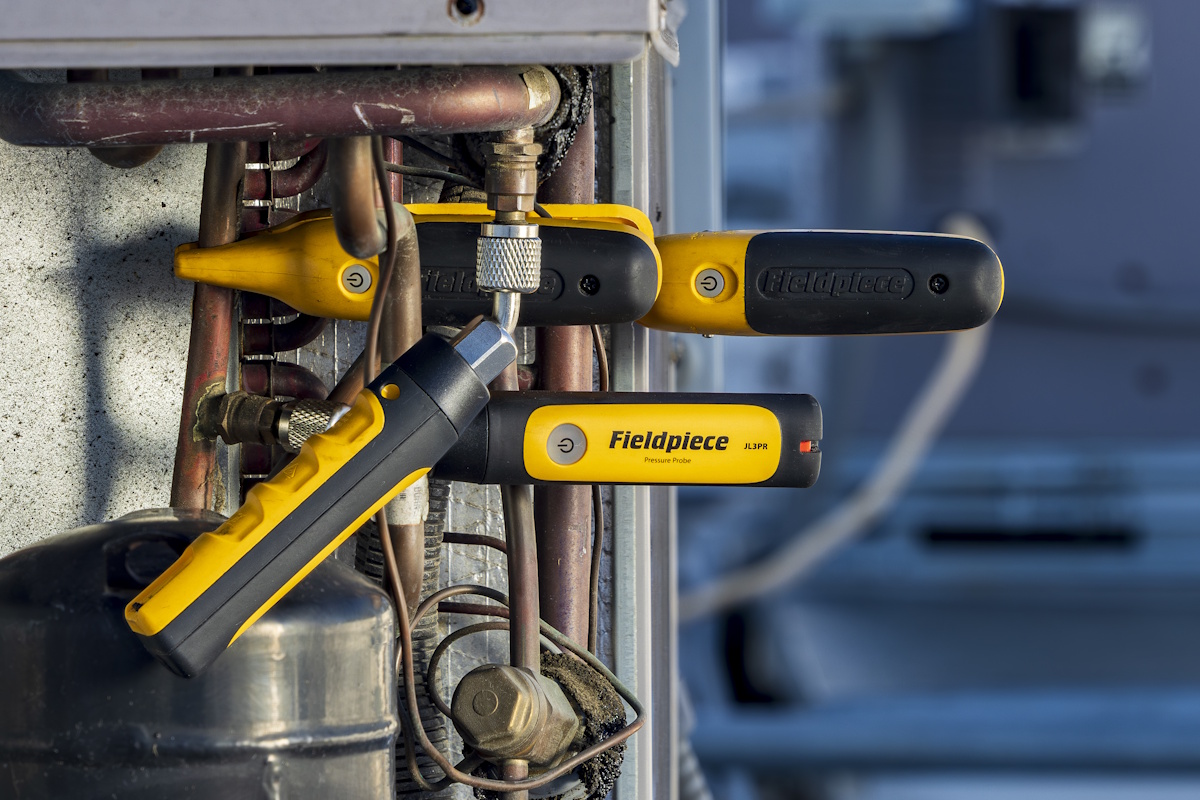
SYSTEM ANALYSIS: Fieldpiece wireless probes, attached to system components, communicate with the Job Link app to give technicians measurements in the field. (Courtesy of Fieldpiece Instruments Inc.)
The Job Link System, from Fieldpiece Instruments Inc., enables technicians to quickly take HVACR system measurements in the field and helps contractors document those findings as well as vital service tasks.
The system brings together Fieldpiece’s wireless measurement probes with its Job Link app. Technicians use the probes to measure system characteristics — such as voltage and power (kW), static pressure, and temperature — during installations as well as during service and maintenance calls, said Tony Gonzalez, director of training at Fieldpiece.
“Monitoring the entire system at the same time, the technician arrives at a quicker and more accurate diagnosis of the system,” Gonzalez said.
The Job Link app, Gonzalez said, documents measurements in a PDF format, and can also document tasks such as leak tests and system refrigerant evacuations.
“This PDF serves as a commissioning report after new installations and a test-out report during service and PM [preventive maintenance] calls,” Gonzalez said.
The “smart” features of the Job Link System are its ability to show an HVAC system’s metrics all at once and generate verification documents; functions that wouldn’t be possible without advancements in wireless technology and mobile app integrations, Gonzalez said.
To use Job Link, a technician needs an understanding of where on an HVACR system electrical, airflow, and refrigerant charge measurements are taken, as well as how to use the app, Gonzalez said. A contractor would need an understanding of the back end of the Job Link software.
“We have an entire training department dedicated to helping technicians learn best practices to do their job easier, faster, and better,” Gonzalez said. “We offer live Job Link System training both in-person and virtual. We also provide training support online at Fieldpiece University.”
Fluke’s iSee Thermal Camera
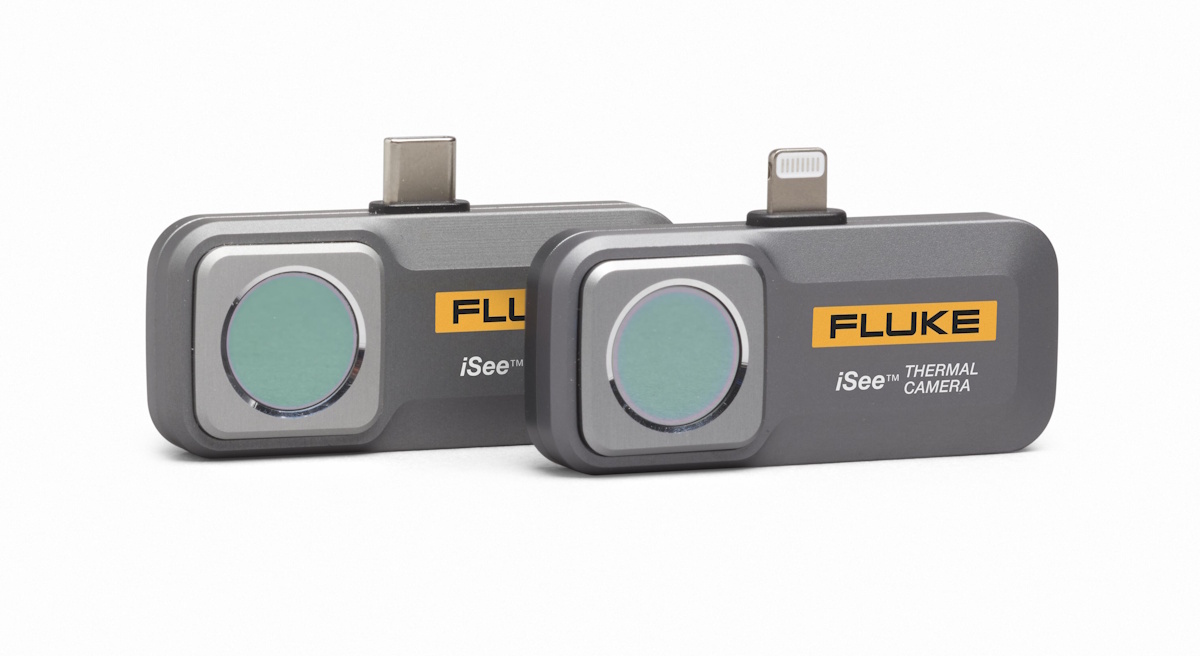
THERMAL AWARENESS: The iSee Mobile Thermal Camera, from Fluke, attaches to a smartphone to turn it into a thermal imaging device for HVACR technicians. (Courtesy of Fluke Corp.)
The iSee Mobile Thermal Camera, from Fluke Corp., turns a smartphone into a thermal imaging device.
Modern smartphones are “highly capable” computing systems, said Filip Bras, product manager for thermal imaging at Fluke. “The iSee taps into that ecosystem, essentially offloading much of the processing and user experience to the phone,” Bras said. “That enables real-time thermal analysis, intuitive app-based controls, and instant sharing of images and findings, capabilities that traditionally required bulkier, standalone equipment.”
The iSee, available for both Android and Apple phones, provides a live thermal image that highlights temperature differences, revealing issues that can’t be seen with the naked eye.
Technicians can perform spot, line, and area temperature analyses; capture high-resolution thermal images; and work across temperatures ranging from 14°F to more than 1,000°F. An accompanying app enables image editing and annotation, video capture, and reporting, streamlining documentation and communication with customers and team members, Bras said.
The iSee can be used to detect overheated electrical connections, find duct leakage, pinpoint gaps in insulation, and diagnose air flow issues. It’s helpful for troubleshooting compressors, motors, and refrigerant lines — in short, any component in which temperature deviations indicate something is wrong, Bras said.
“It’s particularly useful in situations where access is limited, or safety is a concern, allowing technicians to assess equipment from a distance,” he said. “It also plays an important role in verification to confirm that a repair has actually resolved the issue.”
Little training is required, Bras said, and most technicians can start using the iSee immediately. Quick-start guides, training videos, and a mobile app can walk users through the basics, he said.
“There’s a short learning curve around interpreting thermal images, understanding what ‘normal’ versus ‘abnormal’ temperature patterns look like, but that knowledge tends to develop quickly with real-world use,” Bras said.
Milwaukee Tool Recovery Machine
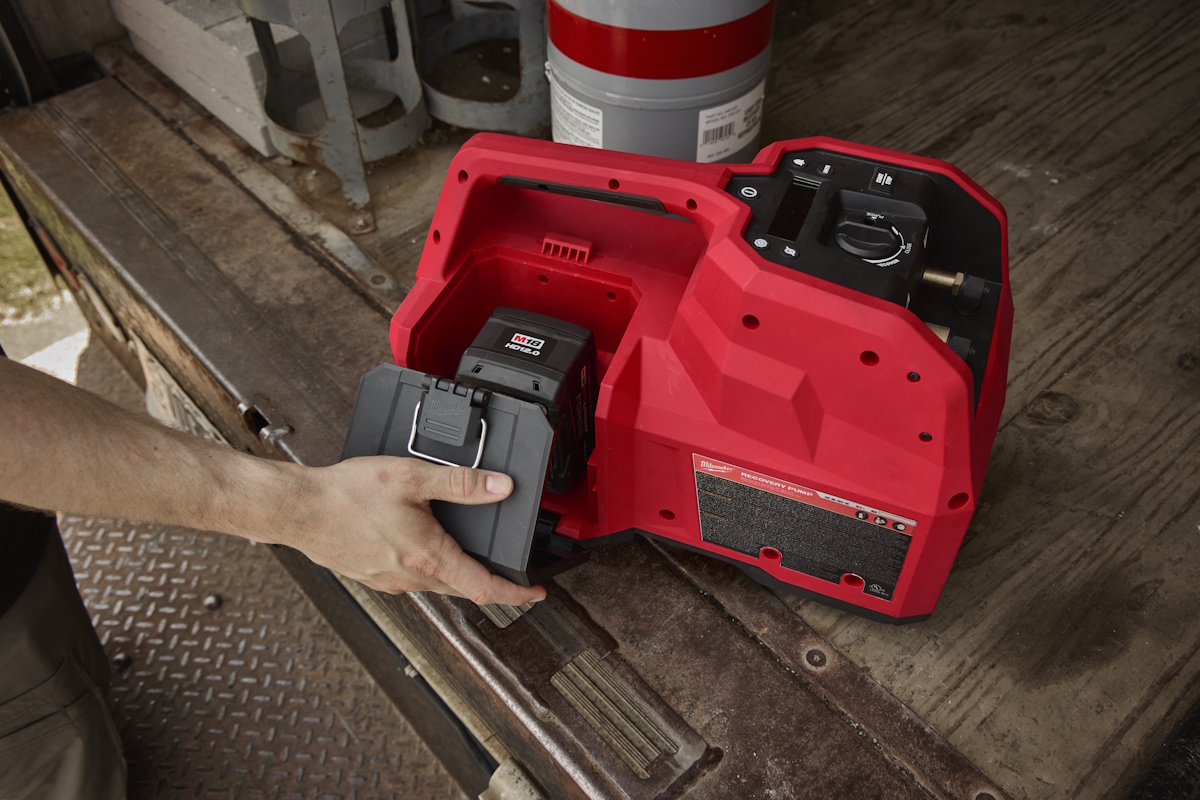
CORDLESS POWER: The Milwaukee Tool M18 Brushless Refrigerant Recovery Machine runs on an 18 V battery and, when used with the M18 Fuel 5 CFM vacuum pump, can recover up to 10 pounds of refrigerant. (Courtesy of Milwaukee Tool)
Milwaukee Tool’s M18 Brushless Refrigerant Recovery Machine is the industry’s first battery-powered recovery tool, used for taking refrigerant from a system prior to service or repair.
“Technicians value the ability to set up faster, avoid cords, and complete recovery with greater flexibility,” said Riley Peterson, a manager of product marketing at Milwaukee Tool. “The shift to a fully cordless workflow has helped reduce downtime and simplify service calls in environments where power access is limited.”
The machine is powered by Milwaukee Tool’s M18 battery platform (18 V) and allows for cordless recovery of up to 10 pounds of refrigerant when paired with the M18 Fuel 5 CFM vacuum pump, Peterson said. The smart feature, he added, is automated control, which allows technicians to designate low- and high-pressure shutoff points and powers down the machine when those levels are reached. “This helps increase user control, reduces manual monitoring, and supports a more efficient recovery workflow,” Peterson said.
The machine has an LCD screen, enabling easy viewing of refrigerant levels in daylight, and check valves to prevent backflow should the battery become depleted during operation.
The M18 Brushless “is designed to be intuitive and easy to use” and requires no specialized training but for standard refrigerant recovery training, Peterson said.
“Milwaukee Tool supports HVACR technicians with a range of training resources, including product videos on their website and social media, and in-person support through its nationwide sales team,” Peterson said.
Digital Manifold Gauge From Navac
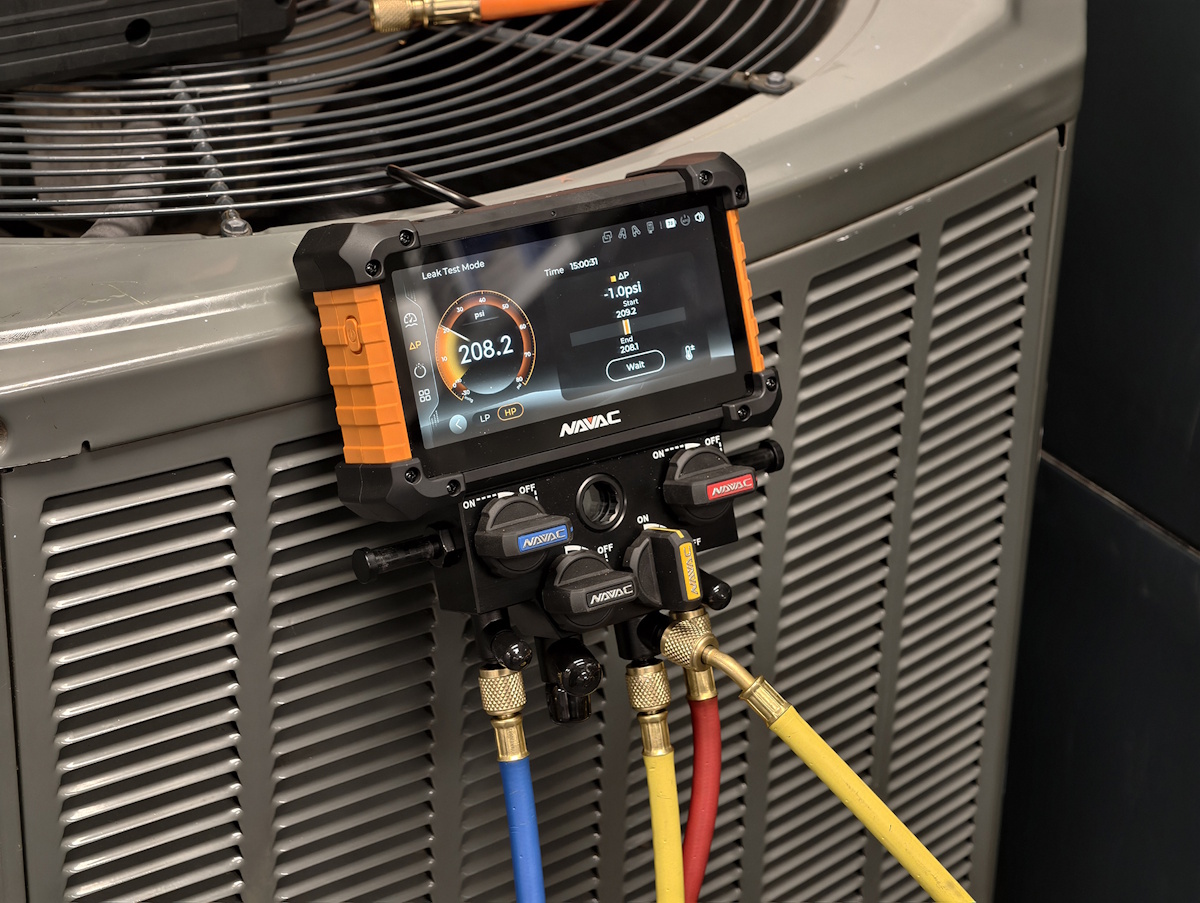
WIRELESS CONNECTIVITY: The Nexus 2 digital manifold gauge, from Navac, integrates with mobile apps to provide real-time refrigerant system data. (Courtesy of Navac Inc.)
Navac Inc.’s Nexus 2 is a digital manifold gauge that is used for diagnosing issues in cooling and refrigeration systems and for refrigerant charging and evacuation. It offers wireless connectivity and integrates with specialized mobile apps to provide real-time data, said Andrew Greaves, director of user experience at Navac.
The Nexus 2, just introduced this year, not only provides fast answers and reduces math errors on routine service calls, Greaves said, but also performs specialized tasks such as monitoring trends and logging data for commissioning complex commercial systems.
“A technician would need this tool for system diagnostics, performing leak tests, and managing evacuation/charging processes,” Greaves said. “It is particularly useful when they need to move between these core service functions without reconfiguring their setup, saving time on the jobsite.”
The smart features of the Nexus 2, Greaves said, are its high-definition touchscreen, wireless connectivity, and ability to calculate superheat and subcooling through the use of Navac temperature clamps. The Nexus 2 can perform saturation temperature calculations for up to 100 refrigerants, including lower-GWP options, and updates are available through the myNavac app, he said.
To use, technicians need to be comfortable navigating a touchscreen and interpreting visualized data, Greaves said. The Nexus 2 is designed to be user-friendly.
“NAVAC focuses on intuitive user experiences ... to ensure technicians can approach diagnostics and evacuation with confidence,” Greaves said.
Looking for a reprint of this article?
From high-res PDFs to custom plaques, order your copy today!