Motor Tips: Overload And Speed Change

How To Tell When A Motor Is Overloaded
A good indication that a motor may be overloaded is overheating, or in some cases not starting at all. For HVAC motors it can be as simple as belts that may be too tight, inadequate wiring, or voltage that's too low. Possible corrective actions can include: readjusting belt tension, increasing the motor size, and corrective adjustments to the power situation.How do you know that the motor is overloaded? The first sign that a motor is the wrong size for the application is frequent nuisance tripping of the thermal reset (also called a thermal protector). Check to see if the applied voltage agrees with the nameplate. If it does, check to see if the motor and drive turn freely. If the voltage to the motor looks good, and the drive system has free motion, there may be a need to increase the horsepower of the motor. Check the power supply to make sure there is enough capability to go up one horsepower rating.
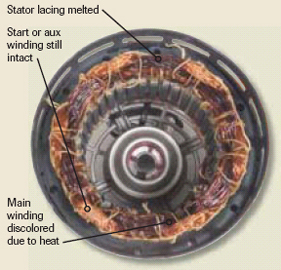
For situations where the motor's overload condition was extreme - possibly a frozen shaft - you'll see a start winding failure. This is when the motor never left the start winding and failed to come up to speed. The internal analysis will show the start winding to be discolored from extreme heat prior to its opening. The main winding will still be intact (Figure 3).

What Effect Does Speed Change Have On Motor Performance?
What can be done with a new replacement direct drive fan or blower motor where little or no speed change can be detected from one connection to the next?This could be a result of:
1. The replacement motor's horsepower rating is greater than the original motor.
2. The replacement motor's speed rating is lower than that of the original motor (e.g., 1,075 rpm compared to the original 1,625 rpm).
3. The original motor was tailored to the application and was designed for a greater speed change than the replacement.
4. The ventilation system was changed in some way, which reduced the load on the motor.
Speed change for a multi-speed shaded pole or permanent split capacitor motor is achieved by weakening the motor at lower speed connections, causing it to operate at lower speeds. If the motor is not adequately loaded, or is too large for the application, little or no speed change will be apparent at lower speed connections.
Looking for quick answers on air conditioning, heating and refrigeration topics? Try Ask ACHR NEWS, our new smart AI search tool. Ask ACHR NEWS
To remedy the situation, the replacement motor must have the same horsepower and nominal full load speed rating as the original motor. Attempting to alter the air delivery or other characteristics of the fan or blower by replacing with a higher (or lower) horsepower or speed-rated motor could result in rapid motor failure. Do not undersize the motor to achieve a greater speed change than the original.
If the replacement motor is equivalent to the original and the speed separation still is not apparent, the ventilation system may have been changed, reducing the system load and the load on the motor.
Too much motor loading to achieve a greater speed change may overload the motor. System alterations must be made in small steps to prevent overloading.
Reprinted with permission from On the Job, May 2005, Grainger's quarterly newsletter for professional contractors. For more information, visit www.grainger.com/contractor.
Note: This information has been checked for suitability. However, a successful solution depends on individual accuracy, skill, and caution. For this reason, W.W. Grainger Inc. does not guarantee the result of procedure compliance or assume responsibility for personal injury or property damage to persons following these procedures.
Publication date: 08/08/2005
Looking for a reprint of this article?
From high-res PDFs to custom plaques, order your copy today!