Top 5 Benefits of using CAD Software for USA Based Metal Manufacturers
The US metal fabrication market is expected to surpass a valuation of US$473.7 billion by 2031.
.webp?t=1675271237)
That US metal manufacturers are going all out to adopt sheet metal CAD software is not surprising. The US metal fabrication market is expected to surpass a valuation of US$473.7 billion by 2031. And catering to that huge demand is impossible with their current legacy tools and workflows, limited staff, and resources.
Issues of material sourcing and logistics are more prevalent than ever in a no-touch economy. And the prospect of moving parts of the manufacturing pipeline offshore and nearer to resources becomes attractive. Also, an asset-light business model helps a manufacturer gain a competitive edge and agility. But for US metal fabricators, such a business model has its own issues of remote collaboration, coordination, design intent communication, and of quality and speed. All of which sheet metal design software helps to resolve to a great extent.
Challenges in remote metal fabrication for US metal manufacturers
Many large US metal manufacturers have already acquired smaller metal manufacturers in Europe or other parts of the world and have set up remote work arrangement. However, acquisition or partnering is not cumbersome; the real challenges appear after an acquisition is over. There are many teething issues in setting up a smooth remote workflow. Most of them persist because of clinging to legacy tools and workflows.
The issues go beyond cross-border communication of design intent to being cross-cultural. US designers use one set of standards and measures, while Europeans use another. Converting every design detail manually is extremely challenging. Not using CAD tools such as SolidWorks or Inventor for sheet metal modeling leads to project delays and budget overruns.
Tackling design communication with sheet metal CAD software
Developing design briefs as CAD models and drawings makes it easier to communicate intelligence and intent across teams. Modern CAD platforms essentially help standardize the language of data exchange across geographies, industries, companies, and individual stakeholders. From design to manufacturing, almost everyone is using CAD as a medium for seamless handoff. We elaborate here on some of them.
1. Following one set of standards like AWS, ASME, etc.
The biggest challenge that American metal manufacturing companies may face after acquisition is maintaining consistency in using design standards. For instance, although ASME is the most accepted system of standards, several European manufacturers still use IS or BS standards. As a result, the engineers often get lost in converting the values.
Using CAD, the design engineer can simply set drawing standards to the desired system. The same will be used across the project. Once the project is over, they can reset it to new systems, as per the need. They can even switch between two standards each time a new CAD project is started. Thus, CAD smartly solves the collaboration issue between geographies.
2. Strict adherence to Design For Manufacturing [DFM] guidelines for sheet metal
Leading CAD platform developer Dassault Systemes and Autodesk sell products with inbuilt features of DFM guidelines and sheet metal design modules. These products, SolidWorks and Inventor, perform design calculations as per set parameters. The designer can simply adjust these rules based on the project s/he is working on for efficient sheet metal designs.
Other dedicated sheet metal features in CAD include the consideration of universal DFM guidelines. It, thus, spares the stakeholders from having an endless discussion on providing bends, spring-back effects, material-based allowances, k factor, designing flanges, etc. Multi-component assemblies can also be developed for a range of industries using different combinations of metals.
3. Accuracy in design detailing
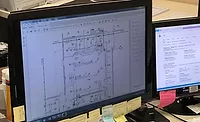
Once 3D models are approved, deriving 2D drawings for manufacturing is easy. The CAD engineer simply extracts the drawings and adds details for a detailed design handoff to the shop-floor engineer. From specifying dimensions and tolerances to specifying manufacturing allowances and material selection, sheet metal CAD shop drawings would contain everything.
Parametric CAD platforms reflect changes in one dimension across the assembly. As a result, when the parent model is altered, the corresponding dimensions in the shop drawings will also be updated. Subsequently, the tolerances and allowances will also be changed automatically.
Ideally, all CAD drawings are saved with a .dwg extension. Sharing such files can be tedious and may cause data loss. But CAD platforms also offer neutral file formats like IGES or STEP for seamless data exchange between teams and across organizations. These files can easily be shared using a cloud platform irrespective of geographical location. One can also track changes and last review credentials to maintain integrity.
4. Flexibility and seamlessness during design development
Especially in design development, a designer spends most of his/her time designing and redesigning parts to meet engineering, functional, and aesthetic needs. As a result, there is significant rework and heavy time investment.
With CAD, creating a part, erasing it, and recreating it is easy and fast as the files are digital. Further, basic geometric shapes like extrude, revolve, polylines, bends, etc. are only a click away. Even repetitive patterns can be easily copied and replicated.
3D CAD adds visualization and approval to the quick-paced design development. A part in 3D can easily be zoomed in and zoomed out. This gives the designer and the reviewer a comprehensive idea of the design essence for faster approval. Ultimately, the designer can release the designs for manufacturing, and the product’s total time to market also comes down.
5. End-to-end collaboration from pre-sales to manufacturing and beyond
CAD models are not merely used for design handoffs. They are essentially digital prototypes of physical products developed way before the actual product itself. These digital prototypes are tested, validated, and saved for future referencing.
Manufacturing companies develop sheet metal parts and render them in 3D. Once validated, the rendered images of models can be used for marketing, sales, and sharing with customers. Further, the assembly can be animated, showing a proper sequence of installation to assist onsite.
Next, when the product wears out, this model can be retrieved easily and reused to recreate the part. In most cases, recreation also involves re-engineering. This gives the designer a base to begin with and develop even a completely new product by preserving legacy designs.
Conclusion
Given the rise in acquisitions of foreign companies in the US metal manufacturing industry, collaboration between design managers and shop floor engineers is becoming extremely difficult. In the absence of one standard platform for design communication, product design development enters a vicious circle of development and redevelopment.
CAD helps overcome this iterative process through standardization in digital 3D and 2D formats. Modern CAD platforms are not just efficient but also user-friendly and can be highly customized as needed. They have many functionalities in reach of few clicks and enable quick design development for US-based manufacturers.
Looking for a reprint of this article?
From high-res PDFs to custom plaques, order your copy today!
.webp?height=96&t=1687000037&width=96)