The Tablet's Potential For Engineering Buildings
The first installment in this series introduces the collaborative tablet engineering experiment, and it establishes a roadmap for exploration of the tablet’s potential contribution to enhancing and streamlining our collective engineering endeavors.

FIGURE 1. Adopted from ASME.

TABLE 1. Acitivity-Task Matrix
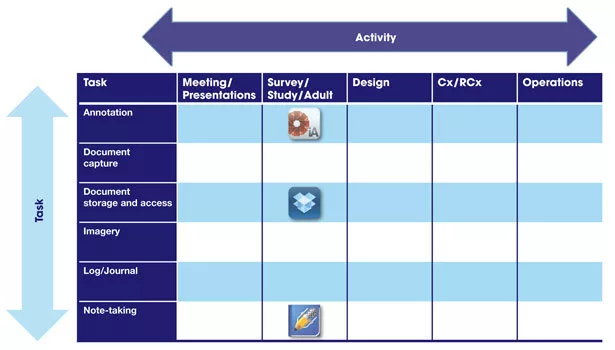
TABLE 2. Acitivity-Task Matrix
When I was a kid, programming on my Texas Instruments TI-16 and later on a Commodore 64, I was making simple games to play. While I did not realize that such machines would later become indispensable to my work (and to most everyone’s work), I did imagine that one could probably use the computing power for more productive tasks, although I could not picture what those tasks might be at the time.
Now, as I sit holding a tablet (a 3rd-generation iPad to be specific), I find myself asking the same question, but this time I am envi-sioning the potential tasks and how they might contribute to a larger whole. I have been experimenting with the tablet’s utility as an engineering productivity tool for some time now, and I am hoping through this series of articles to share the results of my experimentation and collaborate with you on potential ways it can enhance or streamline our collective engineering endeavors. At the same time, my eldest daughter, now in sixth grade, is embarking on a similar discovery as she and her classmates use iPads as productivity tools in the classroom. And I suspect that given her propensity for readily adapting to and utilizing new technology, I will learn some things from her that I can also share with you.
Before I get to the experimentation part, the first challenge I encountered was using the tablet consistently, and I am admittedly still working on this. After years and years of going to the personal computer as my primary computing tool, with its all too familiar keyboard and mouse or touchpad, I find myself a little discomforted by the tablet. For starters, getting used to typing on a tablet takes some time, and I have a tendency to fall back to the PC for anything that requires composing more than a few sentences. However, that brought me to my very first moment of tablet enlightenment: Maybe one does not have to type. It has a microphone and a camera, and you can use your finger or a stylus to write or draw. New form factor, new forms.
Furthermore, I tell myself that during the transition to the personal computer, it must have felt terribly awkward for professionals accustomed to working with paper and pencil to work on a computer, and that I must be persistent in my use of the tablet if I ever hope to become proficient. Thus, the second point of enlightenment: Adaptation to the new tool requires a disciplined approach.
Assuming consistent use of the new tool, how do we stand to benefit from adopting this new platform? Aside from the obvious, like using it as a secondary email and text messaging interface, reading books or watching movies on business trips, how can we really adapt it to specific engineering tasks? There are, of course, various engineering and science apps available for both iOS and Android. A search for “engineering” in the iTunes’ App Store, or in Google Play’s collection of Android Apps, yields lists of apps that provide engineering handbooks, calculators, magazines, unit converters, and of course, games. Many of these apps are great reference or educational tools. There are also some very specific-purpose apps, such as those from Autodesk and Bentley for reviewing drawings, for example. However, I believed that what I was seeking resided with the more general purpose apps and their adaptation to specific tasks.
Thus, I started examining how I did my work and assembled a series of common tasks that are frequent elements in an engineering activity, where an activity is an energy study or engineering design. Let’s take an energy and engineering study, of which I do a fair number on existing buildings. Such a study consists of several primary tasks, most of which are focused on multimedia capture of information. The tasks range from note-taking, to imagery, to document capture to name a few. Thinking about the activity and its component tasks in this way, a matrix began to form in my mind.
At the intersection of each activity and task, one or more apps may fit the bill for what we are trying to accomplish. And, this series of articles will set about to seek out those intersections and fill in the matrix, and provide commentary on the apps discovered along the way. I encourage you, the readers, to help me out, sharing your experiences with tablet technology on the job, and together we can collectively develop a body of knowledge and experience, enabling our tablets to evolve from novelties to extremely effective tools in our capable hands.
ENERGY AND ENGINEERING STUDY
Let’s return to the energy study activity and explore it further, illustrating how we will fill in the matrix by examining our first activity. The primary tasks in the on-site portion of an energy and engineering study of an existing building revolve around capturing the data and images that describe the building’s characteristics in enough detail such that estimations can be made on potential improvements, both in terms of savings and corresponding investment. This can be an arduous and tedious task at times.
For example, building dimensions and construction materials may be needed for calculation of thermal losses. And, air handling unit supply air and outside air flow rates are needed to calculate potential improvements that apply to air distribution, fan control, ventilation, and economizer operation. Here are some of the tasks and the apps I’ve been experimenting with and using to complete those tasks on recent energy studies.
TASK 1: STORE AND ACCESS DOCUMENTS
Typically, before going on-site to investigate the building, the owner will share various documents that provide information on the building itself and its mechanical and electrical systems. I often like to make these documents accessible to myself and others such that I can view them if needed while on-site or elsewhere without carrying around a large binder or rolls of drawings. A seemingly ubiquitous app for document storage and sharing is Dropbox. This app allows one to easily store files in the cloud (with 2.25 GB of free storage), to move files from PC to tablet to phone, and to share documents with others. You can call up documents on a tablet for viewing while on the project site.
TASK 2: MAKE NOTES ON EXISTING DOCUMENTS
Taking the first task one step further, most often these days, the documents shared by owners come as PDF files. I have found that making notes on these existing documents is a good way to capture additional information within the context of the existing documentation. While there are a number of apps available for annotating PDFs, one app that does this well is iAnnotate. This app enables you to work with multiple PDF files and annotate them on the fly. It can also incorporate multi-media notations such as photos. And, it offers built-in integration with Dropbox, such that files can be opened from and saved to your Dropbox.
Using these tools and this technique, one can make additional observations about air handling units right on the mechanical schedules, or notate operational details on the existing control sequences.
|
ADDITIONAL READING |
TASK 3: TAKE NOTES WITH MULTIMEDIA
But, what if you need to take notes in a more conventional manner? Let’s say you are interviewing the facility manager. There are a variety of apps for note taking.
One that I’ve come to prefer is Notability. It offers many tools for note-taking, is easy to use, and again, includes built-in Dropbox integration. Notes can be organized in a file structure and are saved as PDFs. Numerous tools within Notability enable text entries, handwriting or drawing, and inclusion of photos and voice notes. I have used this app to capture interview notes, lighting details, and make plans for deploying data loggers.
Placing these apps on the matrix under the appropriate activity allows us to begin to build out one column of the matrix. These versatile apps may very well appear in multiple columns along with new apps as we continue to explore the activities and the means available to approach them on a tablet.
Hopefully, this will get you thinking about how you might do these tasks on a tablet and what apps you would consider using. Or, perhaps you already do some of your work this way and you can share what you have learned. In either case, I am looking forward to continuing exploration of the application of tablets and apps to engineering buildings with you.
Looking for a reprint of this article?
From high-res PDFs to custom plaques, order your copy today!