Tablet As Building Engineering Tool, Part 3: Commissioning
What to use for capturing the images and data you need?
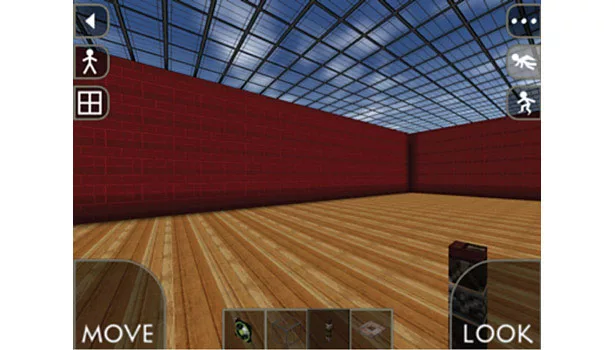
FIGURE 1. Building interior in Survivalcraft.
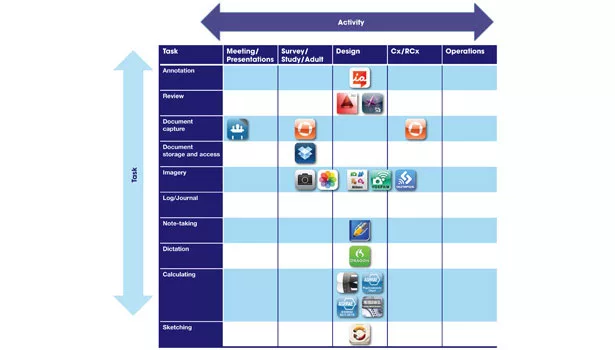
FIGURE 2. Acitivity-Task Matrix. Click here to view a larger PDF of Figure 2.
In the previous installment on using your tablet to engineer buildings, we focused on design, touching upon apps used to sketch concepts, review drawings, and perform calculations. Before we move on to commissioning with our tablets, I wanted to pose a question as old as mobile devices themselves: How does one reign in the use of mobile devices to a reasonable level?
Seemingly constant use of the ubiquitous devices seems to be prevalent if not downright epidemic. Scan any public place, and it often seems that people are interacting with their devices more than with each other. I was standing in line one morning recently waiting for a local store to open, and just about everyone in line was looking at their phone, even those who were waiting with a friend or partner. This issue is especially relevant to raising children who are growing up with ever-increasing access to mobile devices, challenging parents to establish boundaries and set examples of appropriate use.
However, on one recent occasion, I found my younger daughter on my iPad, designing virtual buildings and worlds in Survivalcraft, for hours on end. I was not sure what to do: Ask her to stop because it is too much “screen time?” Or let her go on, quietly and contentedly creating, designing, and building, especially given her application of daylighting. Such are the challenges of our time.
Perhaps the possibility of an irresistible toolset offers the opportunity to inject some of that “can’t stop designing and building” syndrome into engineers, yielding the ultimate productivity tool (or maybe just the ultimate usage of time). I am hoping for the productivity end of the spectrum, so let’s turn our attention from the general philosophy of mobile device use and focus on the task at hand.
Commissioning
Commissioning, in a very general sense as put forth in fellow ES contributor Rebecca Ellis’ very first article on the subject, is a systematic process of assuring by verification and documentation (from the design phase to a minimum of one year after construction) that all building facility systems perform interactively in accordance with the design documentation and intent, and in accordance with the owner’s operational needs, including preparation of operation personnel.
Rebecca goes on to describe the various types of commissioning, from the comprehensive form of design through occupancy commissioning to retro/recommissioning of existing buildings. The various forms of commissioning are primarily differentiated by their scopes and timelines. The good news for us is that no matter the type of commissioning, many of the same tasks are performed. Let’s examine a few and the potential to apply our tablets.
Task 1: Capturing and managing images
We discussed photographic images in the first installment, where we captured notes and photos in Notability as we were conducting an energy study. Digital imaging is probably one of the most useful technologies when working in the field, and it is essential in commissioning. Use it to document the facility, equipment conditions, and the placement of data loggers. Oftentimes, I think of digital imagery as an extension of my memory, and I take photos continuously while on a project site. Of course, the camera itself is an important factor.
My iPhone and iPad take decent photos, and the photos are automatically uploaded via iCloud to my Photo Stream, making them instantly available on any of my devices and my PC. However, when I really want high-quality imagery, I rely on an actual dedicated digital camera, as the embedded cameras cannot produce near the level of image quality with any consistency. Many of the latest digital cameras have built-in Wi-Fi, enabling rapid wireless sharing of photos, and many of the camera manufacturers offer apps that facilitate sharing of photos between camera and mobile device, including Canon, Fujifilm, Nikon, and Olympus.
Task 2: Capturing documentation
Now that we are getting to be experts at capturing and managing images, what about doing the same with documents? Let’s say I need to copy a portion of a drawing, such as a mechanical schedule, or that it would be useful to have the lighting circuits listed in each of the electrical panels to reference later. While there are numerous apps for document scanning, I get good results with Genius Scan and it offers both JPEG and PDF output options. While I am at it, I can also capture the facility manager’s and building engineer’s business cards. There are a variety of apps available for this, but CardMunch seems to yield the most accurate results of the apps I have tried, and it offers integration with LinkedIn.
Task 3: Facilitating instrumentation and testing
The last commissioning activities we will explore are instrumentation and testing. While placing data loggers, it is good practice to record the data logger’s identification along with its location and any attached sensors with their respective input channels. Likewise, when performing functional tests on equipment, it is necessary to record test data throughout the process.
Both of these activities boil down to annotating existing documents, and there are a couple of options: Work with PDF versions of the documents, or work with the original formats such as Microsoft Word and Excel. As discussed in our earlier installments, iAnnotate PDF is a good option for the PDF route. For working with Microsoft Office documents, recommended apps include CloudOn (from CloudOn, Inc.) and Office2 HD (from Byte2). For a full discussion of editing and viewing Microsoft Office documents on an iPad, see “The Best Ways to Edit and View Microsoft Office Docs on Your iPad” (dated June 19, 2013) on Gigacom.
That wraps up another session working with our tablets. Until next time, when we take our tablets to task in post-occupancy facility operations, I wish you productive application on your tablets.
Looking for a reprint of this article?
From high-res PDFs to custom plaques, order your copy today!