Tips for Installing a Remote Monitoring System for HVACR Equipment
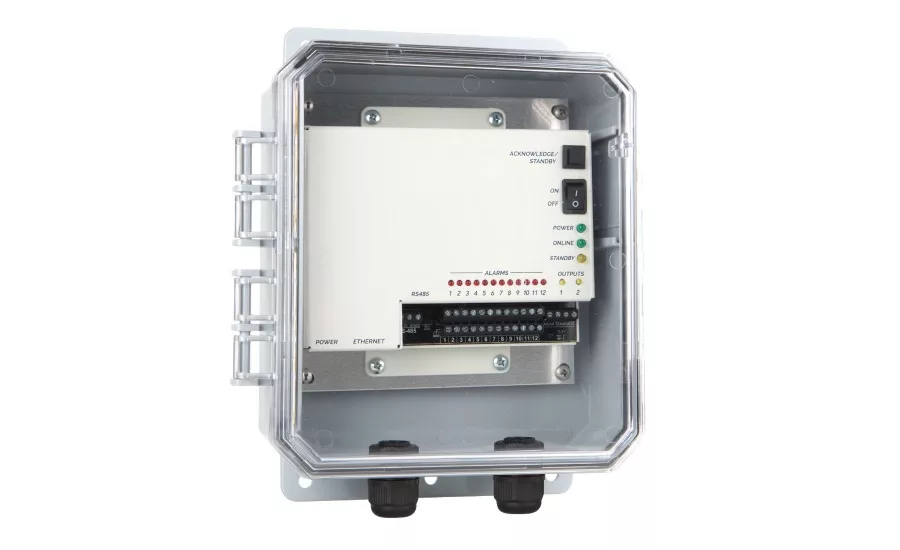
A remote monitoring system that uses cloud-based technology and MODBUS compatibility lets facility managers see the status of environmental conditions and HVACR equipment controlled by a building automation/management system (BAS/BMS). It also sends alerts to personnel when sensor readings fall out of a preset range, so they can quickly address a potential problem.
Keeping watch on conditions and equipment can also uncover a potential equipment failure, prompting personnel to conduct proactive maintenance to stay ahead of a possible problem. Monitoring systems are ideal for watching equipment and environmental conditions in areas like boiler rooms, facility control rooms, generator rooms, air handlers, office spaces, heat pumps, fans, chiller units, and pumping units.
Setting up a monitoring system and sensors can be easier than one might think. Here are some tips to make installation and operation hassle-free:
Determining Type of Monitoring System and Sensors
The first step is to find a reputable, experienced monitoring system manufacturer with a well-trained support team that can assess a company’s needs. When working with the monitoring system representative, firms will want to provide details about the scope of their HVAC system. The rep will then determine the type of system that would best serve a company’s operation, the number of base units needed, and the types of sensors required. Make sure to consider the present situation and future growth. Look for a system that provides status updates in real time from a smartphone app, mobile device, or computer.
Many monitoring devices can easily interface with any equipment that is being controlled by a BAS/BMS. The device should be able to pull values from any MODBUS equipment or sensors and make that information available remotely. Users can set alarm limits on that data and receive alarms. Also, the monitoring device can serve as a simple dial out for any alarms that are already set up.
In addition, these monitoring systems can communicate with additional hard-wired sensors to directly monitor non-MODBUS equipment and environmental conditions. In most cases, sensors are sold separately. The sensors one selects depend upon the conditions a user wants to monitor and how many he or she can connect to the base unit. In general, a company will want to select sensors for monitoring temperature, humidity, water leaks, CO2 levels, power failure, and security. For HVAC monitoring, it is also recommended to include sensors to monitor vibration, pressure, airflow, and differential pressure.
Often, there is no need for a site visit to determine which products are best for a specific application. If a company feels it needs someone to check out a facility, many companies can set up a video conference or FaceTime chat to substitute for being on-site. Alternatively, the manufacturer may be able to recommend local contractors.
Note there shouldn’t be a cost for a demo, consultation, or assistance throughout the sales process. Be sure to ask if there are any fees or licenses to keep using the monitoring equipment after it’s been purchased. Also ask about hard wiring, programming, software setup, and integration requirements.
Setup and Installation
In general, monitoring systems are quick and easy to install, and users can often set them up without hiring an outside expert. In certain applications, however, installations can be more involved when interfacing with a BAS/BMS, and one might need the help of an electrical contractor depending on the conditions a company is monitoring. In situations where an individual needs assistance setting up the system, ask if the manufacturer offers installation services or if they can recommend a local representative.
Physical installation of the base unit is often quick and easy with only three steps:
1. Mount the device to the wall or somewhere secure;
2. Plug it into an electrical outlet and an internet connection; and
3. Connect the sensors.
A user then connect the sensors to the base unit’s terminal strip with wire. Many sensors include several feet of wire but can be installed 1,000-2,500 feet away from the base unit, depending on the type of sensor. If wires need to be run through walls or ceilings, it’s a good idea to hire an electrician. Once the device is plugged in and connected to the sensors, a user will often have to create an account on the associated website to begin using the system.
In some cases, a monitoring system can work with other manufacturer’s sensors. For example, certain monitoring units can connect with most digital, analog, or MODBUS sensors and transmitters regardless of the brand. When selecting sensors, an individual might have a choice between ones that are designed by the manufacturer to work specifically with the monitoring system or universal components made by a third party. If the components aren’t made by the system manufacturer, an individual may want to find out if they have been tested with the monitor he or she is choosing and if he or she needs to work with another vendor to purchase the parts.
Recommended HVAC Monitoring Areas and Applications
Boiler Room: Pump system for air conditioners and chillers
• Chiller flow;
• VFD faults;
• Amps;
• Temperature; and
• Status.
Facilities Control Room
• BAS/BMS system;
• Water leak detection;
• Temperature; and
• Humidity.
Generator Room and Air Handlers
• Power loss;
• Generator status;
• Fire panel;
• Speed;
• Airflow;
• Differential pressure; and
• Net meter.
Heat Pumps, Fans, Chiller, and Pumping Units
• Motor vibration;
• Amps;
• Voltage;
• Status; and
• Line pressures.
Common Areas
• Room temperature;
• Humidity;
• CO2;
• Water leaks; and
• Smoke/fire.
Connectivity
Most remote monitoring systems require an internet or Wi-Fi connection and access to an electrical outlet to power them. All programming is done through a website, so it’s easiest to use a computer or tablet for the initial setup.
If an internet connection is not available at the location, choose a cellular system. The cellular monitoring device will need to be registered on a wireless network, like Verizon or AT&T, before one can send or receive messages. Before purchasing a cellular device, a company will want to make sure that there’s sufficient signal strength at the site.
With these systems, designated personnel are instantly notified by call, text, or email when sensor readings fall outside of preset parameters. If a company doesn’t want all its personnel to receive notifications at the same time, some devices can be programmed to send alerts in a tiered fashion or on a schedule.
Multiple communications methods, like phone, email, and text, provide extra assurance that the right person will get the alert. It’s a good idea to check the number of people the system can reach and if the system automatically cycles through the contact list until someone responds. Some systems allow for flexible scheduling, so that off-duty personnel don’t receive alerts.
Wired vs. Wireless
Wireless can mean two different things as it relates to monitoring: How the system communicates its data to the outside world and how the sensors communicate with the system.
As noted above, some monitoring systems require an internet or Wi-Fi connection to communicate their data to users, but if that's not an option, cellular systems are available. Landline phone-based systems are also available. Sensors communicate with the base unit either through wires that connect them to the monitoring device or wirelessly through built-in radio transmitters that communicate with the base unit.
Data Logging
A data logger is an electronic device that records sensor data at set time intervals. Using a data logger to automatically record information helps identify trends in equipment performance and environmental conditions. This data can provide insight into potential issues that an individual can address before they become bigger problems, such as machine vibrations or differential pressure falling out of the preset range.
If seeing the data in real time, rather than just a few times a day or on a delay, is important, then a company will want to ask about that feature before it selects a device. Cloud-based systems have data logging capabilities and store limitless amounts of information that one can view from any internet-connected device via a website or app.
Emergency Backup
The safest choice is a cloud-based system that comes with a built-in battery backup that will last for hours in the event of a power failure. Cloud-based units constantly communicate a signal to the cloud to validate their online status. If the communication link is interrupted — for example by a power outage or an employee accidently switching off the unit — the system generates an alarm indicating that the internet connection is lost or that there is a cellular communications problem. Users are alerted about the disruption through phone, text, or email. All data collected during this time will be stored in the device and will be uploaded to the cloud when the internet connection is restored.
If a user opts for a cloud-based monitoring system, make sure the infrastructure used to create the cloud platform is monitored 24/7 by the manufacturer’s team. Ask if they have multiple backups across the country to ensure the system is never down.
It’s important to understand that the manufacturer of a monitoring system is not an emergency call center. A user can program the monitoring system to notify the appropriate personnel in the event of an emergency. It is up to the person using the equipment and his or her staff to take action at that point.
Additional Costs
Many web- or cloud-based systems provide free functionality with some limitations. One might have to purchase a premium subscription to unlock features such as text messaging, phone call alerts, and unlimited data logging access. If a device is required to be on a cellular network, a user should budget an annual subscription cost as well.
Tech Support
Purchase a system from a reputable manufacturer that provides a warranty and offers full repair services in the event the product stops working as it should. Also, research to make sure the manufacturer’s tech support team is knowledgeable and willing to walk a user through any questions he or she have about a monitoring system. Often, support specialists can diagnose and correct unit setup and programming issues over the phone.
It helps to record observations regarding the problem, so the tech team can look for trends and circumstances concerning the issue and better diagnose the problem. Ideally, the manufacturer can provide loaner units if the problem requires mailing the device to their facility for repair.
Final Thought
Installing a monitoring system is an easy and affordable way to make sure equipment is running properly and that environmental conditions are where they need to be to keep an HVAC system operating efficiently and to prevent costly, uncomfortable downtime.
Looking for a reprint of this article?
From high-res PDFs to custom plaques, order your copy today!